MongoDB
MongoDB is a source-available cross-platform document-oriented database program. Classified as a NoSQL database program, MongoDB uses JSON-like documents with optional schemas. MongoDB is developed by MongoDB Inc. and licensed under the Server Side Public License (SSPL).
Creating the server
To create a server, we suppose that you've already created and linked an account into the panel.
In that case, go to DBH server and run this command:
For a free server:
DBH!server create mongodb [optional server name]For a donator server:
DBH!server create-donator mongodb [optional server name]Connect to the database
In order to connect to your fresh created database start the server and use the following link:
mongodb://admin:password@nX.danbot.host:port/?authSource=adminFields
The link given above isn't enough for you to connect to the database, now you have to modify it to actually connect to the database.
Password
"password" can be found in the Startup tab.
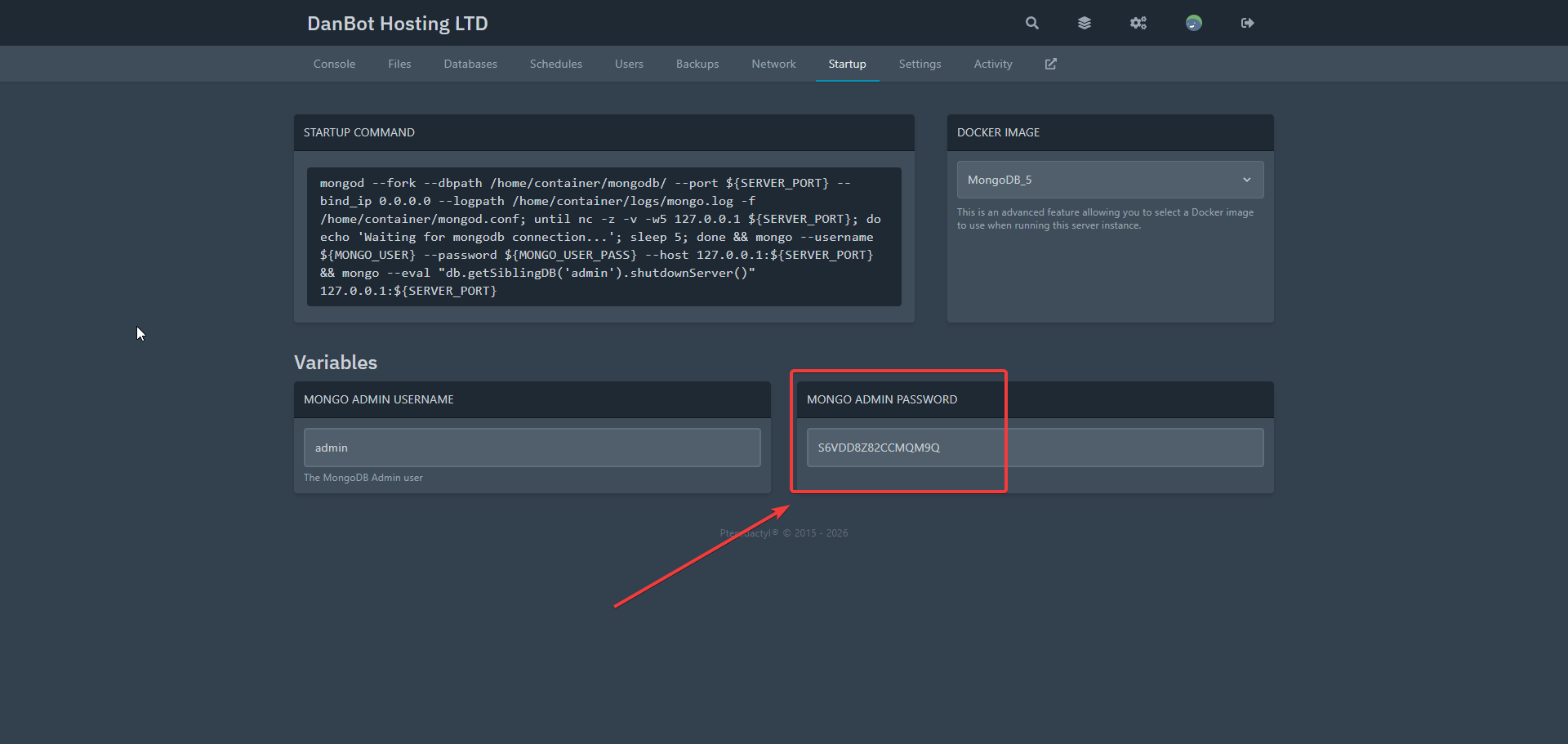
Given page screenshot is an example of the password, it does not carry any important information as the server was already deleted.
Port
"port" is your server's port that can be found in the main page.
Final result
As soon as you finished with the link it should look like this:
mongodb://admin:81OCNEWWJZ1KA0TJ@pnode2.danbot.host:9608/?authSource=adminConclusion
Now you can deal with NoSQL database. To find out more about mongodb visit their documentation website!
Last Updated:
December 27, 2025.